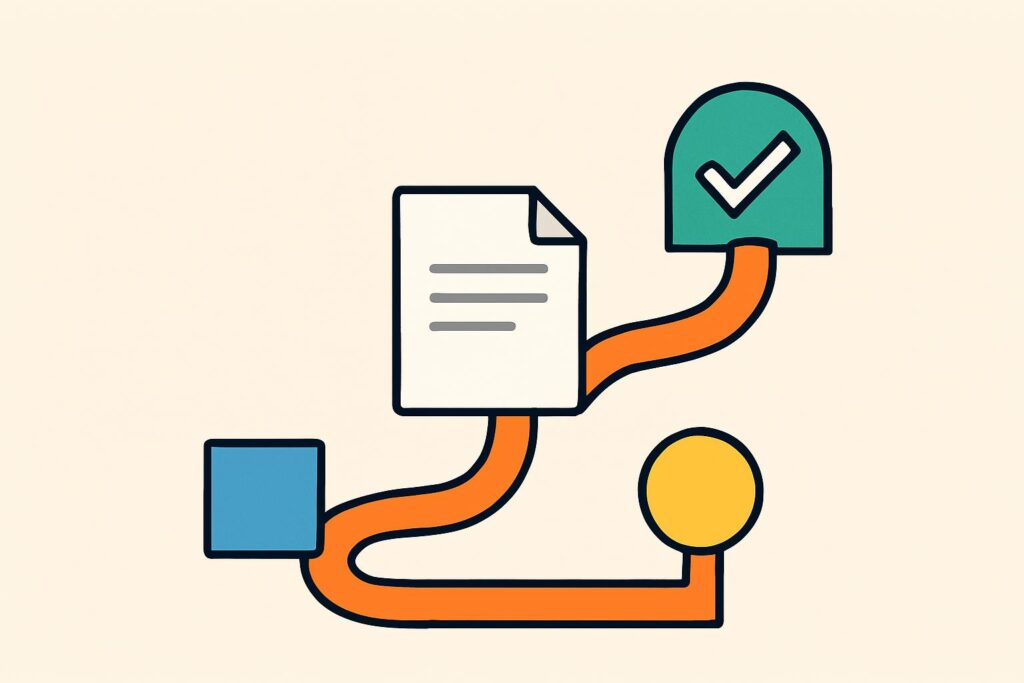
AI agents are pieces of software that are given a task and choose their own steps to complete it, with access to programs such as your email, calendar or document folders. Where a chat program gives you an answer, an agent carries out the work.
That sets an AI agent apart from a chatbot and from fixed automation, which follows a predefined path. Which form fits depends on how predictable the task is.
For an office, the value lies mainly in preparatory work: gathering documents, transferring data, preparing a draft. The best-known agents are already built into software that offices use, such as ChatGPT, Claude and Microsoft 365.
An agent makes the same mistakes as the language model it runs on, but it also acts on them. That is why two questions matter as much as the explanation itself: where does the check belong, and which rules apply when the agent acts on its own?
What is an AI agent?
An AI agent is software that is given a goal, works out which steps are needed to reach it and carries out those steps in other programs, then assesses the result and adjusts course where needed. Within the agent, the language model supplies the reasoning step and the integrations carry out the action.
Three characteristics turn software into an agent. An agent works towards a goal instead of responding to a single question. Along the way, it chooses the next step itself, and it uses tools such as a mailbox, a calendar, a document folder or accounting software.
The term “intelligent agent” predates today’s language models. For decades, AI research has used it for any system that perceives its environment and responds to it, such as a thermostat or a search algorithm. What we now call an AI agent is the version in which a language model handles that perception and the choice of the next step.
How does an AI agent work?
An AI agent works in a loop: plan, carry out a step, look at the result and adjust the plan, until the goal is reached or the agent gets stuck. In each round, the interim state goes back to the language model, which proposes the next step.
The agent prepares; a person approves sending, paying and final recording.
Four components make that loop possible. The language model uses patterns to determine which step logically comes next, and the tools and integrations carry out that step. Memory keeps track of what has already been done, and the instructions set out what the agent may and may not do.
Integrations increasingly run through MCP (Model Context Protocol), an open standard originally developed by Anthropic that lets AI applications talk to other software. As a result, the same agent can work with your email, your case files and your accounting software, without a separate integration for every combination.
An incoming invoice shows how the loop runs in practice. The agent reads the PDF, looks up the supplier in the accounts, checks the amount against the purchase order and prepares a draft entry. If something does not match, it takes a different route, such as sending a question to the employee who placed the order.
What is the difference between an AI agent and a chatbot?
The difference between an AI agent and a chatbot lies in what happens after your question: a chatbot gives an answer, an agent carries out a task. An AI chatbot helps you word an email, whereas an agent looks up the address, sends the email and puts the appointment in your calendar.
Take a request to schedule a meeting with a client about the annual accounts. A chatbot writes a draft invitation that you send yourself. An agent checks both calendars, suggests times, sends the invitation and processes the reply.
The line is blurring, because chat programs such as ChatGPT and Claude now have agent features. So the choice is less about the program and more about what you have it do: give an answer or carry out an action.
What is the difference between an AI agent and fixed automation?
An AI agent differs from fixed automation because it chooses its own path. Fixed automation follows a predefined path, such as a rule that an email with an attachment always lands in the same folder. This reflects the broader difference between AI and automation: automation carries out rules, AI recognises patterns.
The same invoice task can also be handled by fixed automation with rules: supplier A always goes to the same ledger account, and an amount above a threshold goes to the partner for approval. A rule like that is faster, cheaper per action and easier to check, as long as the invoices always look the same.
An agent only pays off where such rules fall short: varying documents, free text in emails or exceptions you cannot write down in advance. For predictable work, fixed automation is the better choice, and many good solutions combine both: fixed rules for the standard case, an agent for the exception.
What types of AI agents are there?
The literature describes five classic types of AI agents, but for an office it is more practical to group them by where they are used. The classic list starts with the simple reflex agent, which responds to a fixed stimulus. Then come the model-based, goal-based and utility-based agents, and the list ends with the learning agent, which adapts its behaviour to earlier outcomes.
In day-to-day office practice, you will come across three forms.
- An agent in your chat program, such as ChatGPT or Claude, that carries out a task at your request while you watch.
- An agent in an automation tool, such as n8n, Zapier, Power Automate or Copilot Studio, that runs in the background within a workflow you have set up.
- A custom-built agent with its own connection to a language model, for a task that no standard tool covers.
Sometimes several agents work together in a multi-agent system, with each agent handling a subtask. For most offices, that is a step too far until a single agent runs reliably on a single process.
What are examples of AI agents?
The best-known examples of AI agents are built into software that offices already use. In July 2026, OpenAI launched ChatGPT Work, the successor to ChatGPT agent mode, which visited websites, filled in forms and collected data on its own.
At Anthropic, Claude Cowork carries out tasks with the files and folders you share, such as tidying up a messy folder or combining scattered notes into one report. According to Anthropic, Cowork activity is now visible in the Compliance API, and Team and Enterprise customers can send it to their own security tools via OpenTelemetry, although OpenTelemetry does not replace audit logging. For a notary or accountancy firm, that record matters more than the convenience.
Microsoft 365 Copilot has built-in agents for tasks including research and data analysis, and with Copilot Studio you can set up your own agent within Microsoft 365. In n8n and Zapier, you add an agent as a step in a workflow, with access to exactly the integrations you give it.
What can go wrong with an AI agent?
The same things can go wrong with an AI agent as with a language model, except that the agent also acts on the mistake. A made-up invoice number then ends up in your accounts rather than in a chat window.
Three risks stand out. The agent passes incorrect data on to a system, or it carries out a wrong action that leaves the office, such as an email to the wrong client. The third risk is access to more data than the task requires.
Then there is prompt injection: hidden instructions in a web page, email or document that the agent picks up as a command. In the worst case, an agent that reads your inbox ends up carrying out an instruction from an outsider.
Where should the check sit with an AI agent?
With an AI agent, the check belongs before every action that cannot be undone or that leaves the office, not after it. An agent may prepare: gather documents, write a draft, set up an entry. An employee approves sending, paying and final recording.
One of the places I worked at the bank was the fraud department, where everything ran on the four-eyes principle, and I apply that principle in all my AI workflows. With an agent, the agent is the first pair of eyes and an employee the second, just before the action.
I have seen for myself what happens without that step. I had a fully automatic content engine that wrote and published articles, and the quality was poor. Now I write with Claude and read everything myself; only the publishing is still automatic.
So build the check into the way the agent is set up. Many tools have a setting that asks for confirmation before risky actions. Switch it on, give the agent access only to the folders and systems the task requires, and have it keep a record of what it does.
Which rules apply when an AI agent acts on its own?
An AI agent that acts on its own falls under the EU AI Act and the GDPR, and in regulated professions also under that profession’s own rules. Which obligations rest with you depends on your role: most offices are the deployer of an agent offered by a supplier, not its provider.
Article 50 of the AI Act is a transparency obligation, not a notification obligation, and has applied since 2 August 2026. Anyone who interacts directly with an AI system must be informed that they are dealing with AI, unless that is already obvious. Formally, that obligation rests with the provider, so ask your supplier how it is handled.
Configuring an agent does not make you a provider. Building an AI system yourself and putting it into use under your own name, even internally, can.
An agent for a use case listed in Annex III of the Act, such as screening job applicants, is, as a rule, a high-risk AI system. The obligations for those systems apply from 2 December 2027. An office that wants its AI Act compliance in order therefore starts with an overview of which agent does which task and which risk category that task falls into.
The GDPR comes into play as soon as an agent processes personal data, and almost every agent that reads email or case files does. Article 22 of the GDPR gives people the right not to be subject to a decision based solely on automated processing that significantly affects them. A rejected application with no human assessment is an example.
An agent that sends data to an external service without a legal basis and a data processing agreement is in breach of the GDPR.
For notaries and accountants, there is also the duty of confidentiality. In the Netherlands, an agent that sends case documents to an AI service must stay within Article 22 of the Dutch Notaries Act (Wet op het notarisambt) or within the professional rules of the NBA, the Dutch professional body for accountants.
Is ChatGPT an AI agent?
No, ChatGPT is not an AI agent at its core, because by default it gives answers rather than carrying out tasks. With ChatGPT Work, though, ChatGPT has gained an agent feature that takes several steps on its own across websites, files and connected apps.
Is agentic AI the same as an AI agent?
No, agentic AI is not the same as an AI agent, because agentic AI describes a property: AI that takes several steps on its own towards a goal. An AI agent is the actual software that has that property, and a system of several agents working together also counts as agentic AI.
Can an AI agent replace an employee?
No, an AI agent cannot replace an employee, because an agent takes over tasks, not responsibility. An agent prepares work and carries out defined steps, but whoever signs off the result, sends it or explains it to a client is still a person.
What changes is how the work is divided: less retyping and searching, more reviewing. Employees therefore need to be able to read an agent’s output critically, and it is up to the office to make sure they can.
What can an AI agent do for your office?
In an office, an AI agent mainly takes over the preparatory work that takes a lot of time but requires little professional expertise. Which task suits this best differs by type of office.
What can an AI agent do for an accountancy firm?
For an accountancy firm, an AI agent can read invoices and bank statements and prepare draft entries in the accounting software. The employee approves each entry before it becomes final. The agent only works with data covered by a data processing agreement, within the duty of confidentiality imposed in the Netherlands by the NBA professional rules.
What can an AI agent do for a notary’s office?
For a notary’s office, an AI agent can gather case documents and list what is still missing for a deed. The agent sends nothing to clients. In the Netherlands, the duty of confidentiality under Article 22 of the Notaries Act and the KNB AI-weegschaal, the Royal Dutch Association of Civil-law Notaries’ AI assessment tool, determine which documents the agent may see at all.
What can an AI agent do for a marketing agency?
For a marketing agency, an AI agent can prepare the monthly report by pulling figures from Search Console and the analytics tool and putting them into a fixed format. The interpretation, and what the agency advises the client, remains the specialist’s job.
Frequently asked questions about AI agents
If you want to start working with AI agents yourself, you first run into practical questions about building them and giving them access.
Can you build an AI agent without coding?
You can build an AI agent without coding in a low-code environment such as Microsoft Copilot Studio. Microsoft describes Copilot Studio as a graphical, low-code studio in which you create an agent by describing in plain language what it should do, then test it before publishing. You build workflows there with a designer in which you drag components into place. For data outside the standard sources, you use ready-made or custom connectors.
Can an AI agent operate your computer?
Yes, an AI agent can operate your computer if it has a computer use feature, such as Anthropic’s computer use tool for the Claude API. Claude then receives screenshots and controls the mouse and keyboard in an environment managed by your own software. Anthropic advises isolating that environment in a separate virtual machine or container with minimal permissions. Have a person confirm decisions with real consequences, such as a payment or accepting terms and conditions.
Can an AI agent work with your own office’s documents?
An AI agent can work with your own office’s documents when you connect them to the agent as a knowledge source. According to Microsoft, an agent in Copilot Studio draws its answers from the knowledge sources you connect, including for questions outside the topics set up in advance. You connect other data sources through connectors. So the sources you connect determine which documents the agent sees.
How do you get started with an AI agent in your office?
Get started with an AI agent in your office by choosing one task that comes up often, has an outcome you can easily check and only needs the agent to prepare. Only once that task has run reliably for a few weeks should you give the agent more steps or a second process.
If you want to learn how to set this up yourself, the AI Automation Course has you build a well-defined automation for one work process from your own practice. The check then sits at the point where the work leaves the office.