
Claude Course
The Claude Course is an online Claude training in English, built for working in the Netherlands and the EU. In 9 to 11 hours you learn to work with Projects, Skills and connectors, practising on your own documents. For professionals who use Claude to analyse reports, contracts and policy.
- €149.99incl. VAT€123.96 excl. VAT
- 9 modulesat your own pace
- 9 to 11 hoursincl. assignments
- Certificateon completion
Prefer Dutch? This course is also available entirely in Dutch, with a Dutch certificate. View the Dutch version
What do you learn in the Claude Course?
What you learn in the Claude Course starts with the character of the model. In my own work with Claude, I notice that it keeps track of long documents better than ChatGPT and more often indicates that something is uncertain. After that, learning to work with Claude is about your own documents rather than sample texts. After the course, you can:
- set up a Claude Project as a fixed workspace, so that context and instructions are kept between conversations
- analyse long documents such as contracts, policy documents and reports in a focused way, and remove hallucinations before they reach your working document
- brief Artifacts so that Claude delivers work products you can use straight away, instead of loose text you still have to edit
- use focused prompting to write a system prompt that makes Claude work consistently to your style and quality standards
- decide when an instruction belongs in the project instructions and when in a system prompt, so you do not have two places that contradict each other
- build your own skill that captures a recurring way of working and works across all your Projects, so you do not repeat the same instruction for each client
- hand tasks over to Claude on your computer and in the browser, with limits and approval moments agreed in advance
In module 8 those parts come together in one workflow of five layers, which you test on real tasks from your own work. Module 9 shows when to hand a task over to Claude and how to stay in control when you do. You need no technical knowledge, because the course is made for professionals without a programming background.
Who is the Claude e-learning for?
The Claude e-learning is for professionals in knowledge-intensive services who release output under their own name or professional responsibility.
| Who | What the course gives you |
|---|---|
| Marketing and SEO professionals | Content, briefings and client communication that stay scalable and verifiable |
| Financial advisers and accountants | Reports and client communication with AI, with a review step before you share anything |
| Legal professionals, lawyers and compliance staff | Analysing contracts and regulations more carefully and more quickly |
| Consultants and analysts | Structuring, comparing and summarising documents for decision-makers |
| People who already use Claude every day | More serious work with long context and less variation between sessions |
Modules in the LearnLLM Claude Course
The LearnLLM Claude Course consists of nine modules that build on each other, from recognising Claude's own character to handing over tasks within fixed limits.
| Module | Topic | What you learn |
|---|---|---|
| 1 | Why Claude is different | Where Claude stands out in your work, such as the large context window, and how to deal with the caveats Claude adds. Including the choice of model between Haiku, Sonnet, Opus and Fable, and the difference between claude.ai and the API. |
| 2 | Projects: your personal workspace | Setting up a Claude Project with fixed context, instructions and files, so you do not start again with every conversation. Including writing good project instructions. |
| 3 | Analysing documents and data | Analysing reports, contracts and policy documents with focused prompts. Detecting hallucinations before they reach your working document, with a contract analysis as a practical example. |
| 4 | Artifacts: output you can use straight away | Briefing Artifacts so that Claude delivers work products you can use straight away, such as advisory notes, summaries and structured analyses. Adjusting step by step without rewriting each time. |
| 5 | System prompts and personas | Writing a system prompt with a fixed structure that makes Claude work consistently to your style, tone and quality standards. Including how to handle conflicting instructions. |
| 6 | Skills: making your way of working reusable | Building a skill that captures a recurring way of working: writing the description that determines whether Claude uses it unprompted, building and uploading the file, combining the skill with a Project, and deciding when to share it within your organisation. |
| 7 | Claude in your working environment | Connecting Claude to the files and apps you already work in: connectors to Drive or Microsoft 365, Claude in Excel, Word and PowerPoint, research with citations, what Claude keeps in memory and how to limit it, and output as a real file instead of text you still have to retype. |
| 8 | Bringing it all together | Combining the five layers into one personal Claude workflow in a Project that you use straight away on your next working day. |
| 9 | Handing over tasks | When a task is suitable to hand over to Claude, working with folders and files on your computer, Claude in Chrome, computer use and scheduled tasks, and the working agreements you record before Claude acts on your behalf. |
Each module contains lessons, a practical assignment based on your own work, transfer and scenario questions, and a knowledge check with instant feedback. A transfer question presents a situation that was not literally in the lesson. A scenario question makes you choose between two options that both seem defensible. The knowledge check tests whether the explanation has stuck. To earn the certificate, you score at least 80 percent on each knowledge check; you may retake it as often as you like.
A system prompt is not a single instruction but a fixed structure that makes Claude work consistently. This is what a system prompt for reviewing documents looks like, exactly what you learn to build in module 5 for your own recurring work.
Role and identity: you review contracts and policy documents.
Goal and task focus: first the core, then the risks.
Behaviour rules: flag what is unclear, do not fill anything in.
Restrictions: use only the text provided.
Output format: short, with a reference to the passage for each point.
Examples of practical assignments
Each module of the Claude Course ends with a practical assignment of 30 to 60 minutes based on your own work, with steps, a worked example and a self-check. Three of them show how this works in practice:
- Module 2: set up a Claude Project for one of your own workflows, with project instructions and three files. Then test how Claude handles a comparable task and a task with missing information, and adjust the instructions based on what you see.
- Module 3: analyse one of your own work documents with a focused analysis prompt and keep a verification log: for each checking technique, what you asked, what came out of it and what you did with it.
- Module 5: write a system prompt for a task from your own work, test it on five scenarios, two of them edge cases, and record what you change in version 2 and why.
The final assignment based on your own work
In the final assignment of the Claude Course, you bring the end products of the nine practical assignments together in one work portfolio. It includes your set-up Project, your analysis report with verification log, your Artifact template, your system prompt with test matrix, your first skill, your workflow on one A4 page and your working agreement for agentic work, completed with a self-evaluation.
You keep the final portfolio yourself. You do not submit any documents for assessment, so contracts, case files and client documents stay within your own environment; you check your result with the self-evaluation from the course.
Not a fictional practice scenario, but a piece of work from your own job that you reuse straight after the course.
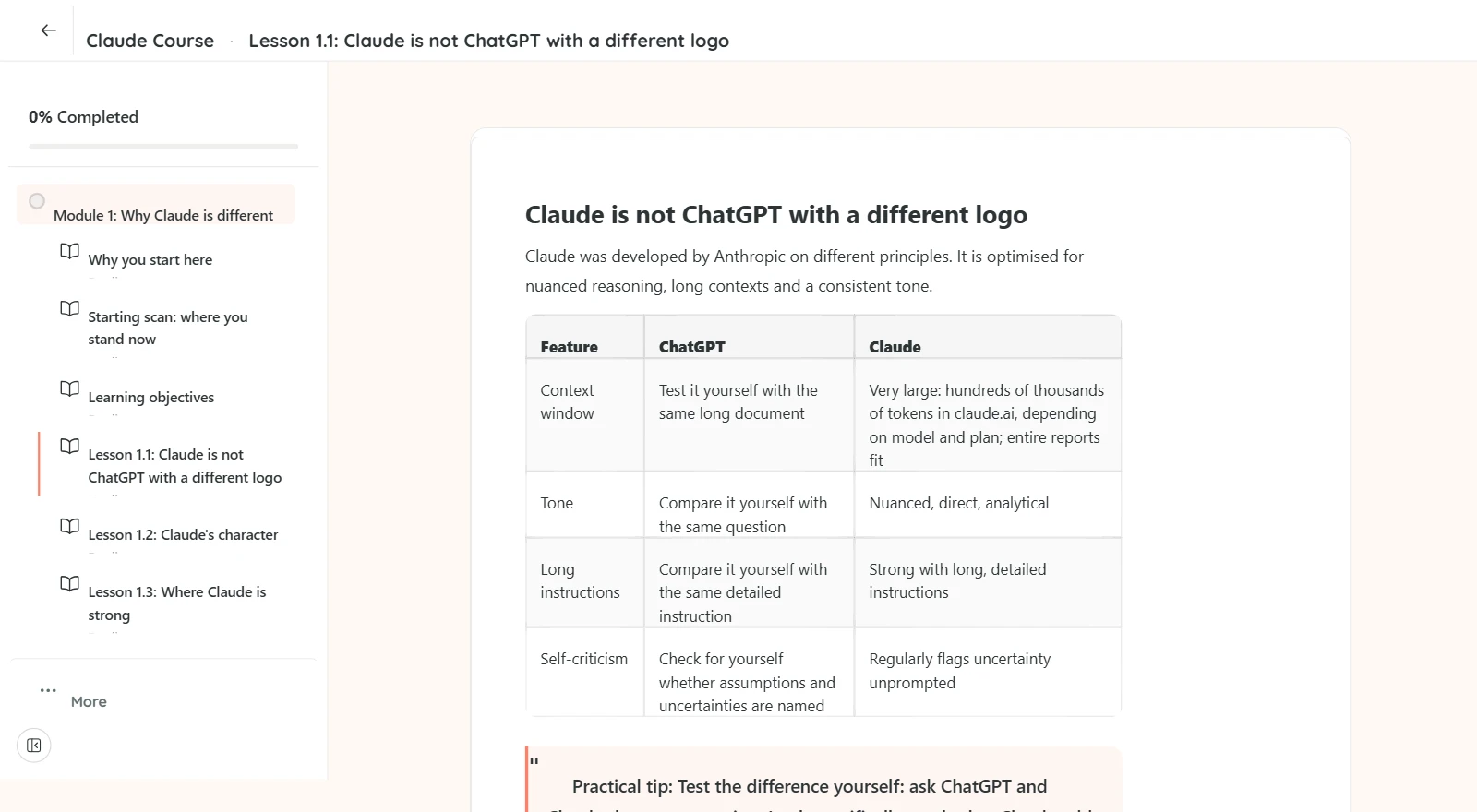
A look inside the online Claude learning environment
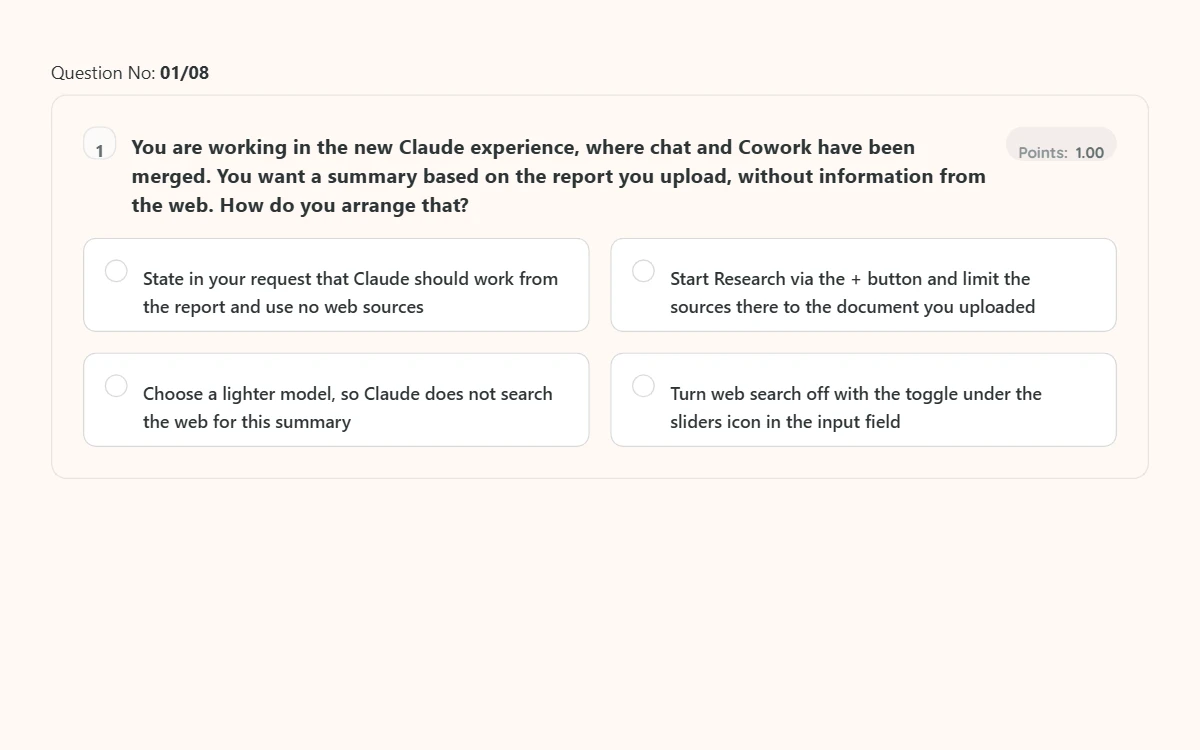
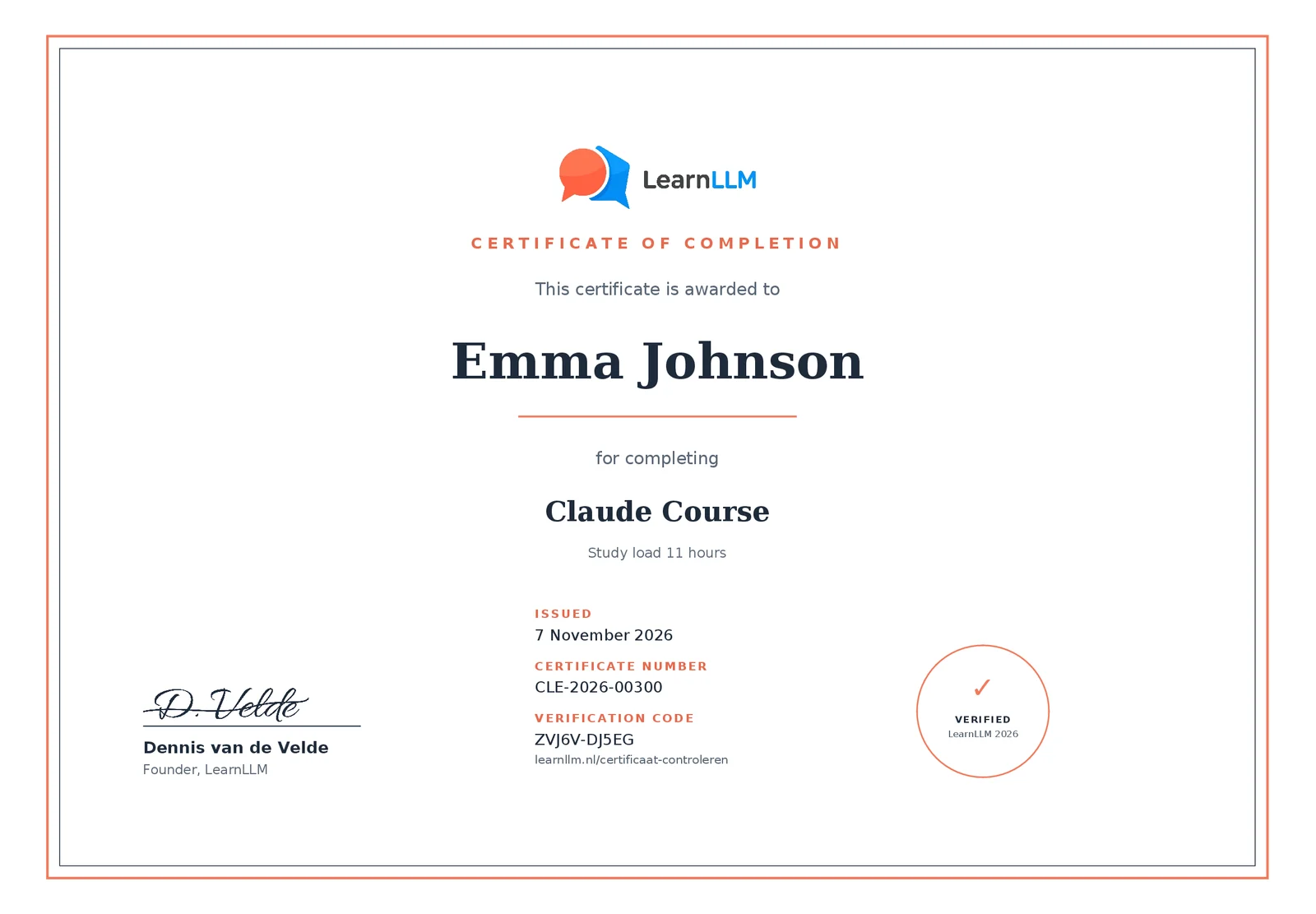
After you enrol, you work in the online Claude learning environment shown below. On the left are the lessons of the module and your progress; on the right you read the lesson. After each module there is a short test with one question per screen, and when you complete the course you receive a certificate in your name.
Tap an image to view it at full size.
€149.99 incl. VAT, instant access after payment.
Why take an online Claude training instead of working it out yourself?
An online Claude training gives you more than working it out yourself, because Claude makes mistakes that look convincing. The model can leave out information, distort nuances or present an analysis that is internally consistent but does not match your source material.
Most professionals discover Claude through a colleague or an article and get started right away. No Project, no system prompt, no checking routine. Every session starts from scratch, with varying results.
This course teaches you to use Claude in a structured way, with a fixed workspace, consistent instructions and an approach for verifying output before you share it. That way of working is repeatable, so you keep using it and can pass it on to colleagues. At team level, a different question arises: how do you make sure all employees use Claude in the same way, with the same checkpoints? For that, you give the whole team the same foundation and record the agreements in an internal AI policy.
Who made the Claude AI course?

The Claude AI course was made by Dennis van de Velde, SEO specialist at Space'M Online and a daily user of Claude in production. Claude is my primary daily tool, through claude.ai and through the API in Python on my own VPS infrastructure.
In my own SEO work, Claude runs in content pipelines, analysis tools on Search Console data and competitor monitoring. The examples in the course come from that work, and each one was tested against the question of whether I would publish the output under my own name.
Before that, I worked at Rabobank, ABN Amro and Van Lanschot, where the four-eyes principle is a strict requirement. That review standard is built into every module of the course.
Claude training for teams and businesses
Claude training for your whole team runs through the office licence. Each employee then works in their own account on their own work email address, so you can see for each person who has completed which course.
For teams from five employees
Every employee gets their own account and a certificate in their own name, with a price per seat per year and payment on invoice. We set up your team for you: tell us how many employees and which course, and you receive a quote within two working days.
Two to four colleagues? Then have everyone buy the course separately in their own name and with their work email address, for €149.99 per person incl. VAT. That way each colleague gets their own account and their own certificate. Each colleague pays in their own name; one order enrols one account.
Your own house style in the course environment, SCORM export or scenarios from your own practice fall under AI training for teams.
Organisations that first want a shared foundation for the whole team start with the AI Literacy course: in it, everyone learns to assess AI output, decide which data never goes in and record the agreements in an internal AI policy.
Ready to take the Claude AI course?
The Claude AI course takes nine to eleven hours, including practical assignments, and in that time you build a workflow you can use on your own documents tomorrow. Instant access after payment, available for 12 months, a personal certificate on completion and an invoice in your company name.
14-day satisfaction guarantee for private individuals, as long as you have completed no more than 20 percent of the course. If you pay in a company name or with a VAT number, you buy as a business and the guarantee does not apply. The conditions are in the refund policy.
Which other AI course suits your work better?
Another AI course suits you better if your work mainly consists of short texts, if you do not yet have agreements on what may and may not go into an AI tool, or if you want to call Claude from your own scripts. All courses start from the same basis, checking against the source before output goes out; how that is worked out differs per course.
| Course | Choose this if | Time | Prior knowledge |
|---|---|---|---|
| AI Literacy | You use AI without agreements on input, review and responsibility, and want to lay that foundation first | 8 hours | None |
| ChatGPT Course | You write, communicate and brainstorm a lot, in shorter pieces rather than long case files | 8 to 9 hours | None |
| AI Automation Course | You want to call Claude from your own tools and automate recurring work | 8 to 9.5 hours | None |
The usual route is this Claude Course first and the AI Automation Course after it, because a workflow that does not work in the interface only goes wrong faster through the API.
Frequently asked questions about the Claude Course
The questions below about the Claude Course cover the price, the format, prior knowledge, how up to date it is and what you can do after the course.
How much does the Claude AI course cost?
The Claude AI course costs €149.99 per person incl. VAT. Business customers reclaim the VAT through their VAT return. For teams of five or more employees, the course runs through the office licence: €169.99, €149.99 or €129.99 per employee per year incl. VAT, depending on team size, for all four courses.
Is the Claude Course in English?
This Claude Course is fully in English and built for working in the Netherlands and the EU: the lessons, the practical assignments, the tests and the certificate. The examples come from Dutch working practice, such as contracts, policy documents and client reports. You can also simply use Claude itself in English.
Is there a free Claude course available?
Through Anthropic Academy, Anthropic offers courses that explain Claude's features, such as Claude 101. This Claude Course is paid and goes further: built for working in the Netherlands and the EU, with practical assignments on your own documents, knowledge checks and a certificate of completion.
How can I learn Claude AI?
You learn Claude AI by practising on tasks from your own work, in a fixed order. In the Claude Course you start with what Claude does well and less well, then set up a Project as a fixed workspace and build on that step by step with system prompts, Skills and connectors. At the end, you combine everything into one workflow that you use on your next working day.
How do I enrol several colleagues at once?
From five employees, you enrol several colleagues at once through the office licence: you tell us how many employees via the contact page, receive a quote within two working days and pay by invoice. We set up an account for every employee, so the certificates and completion dates stay traceable per person. With two to four colleagues, each person buys the course separately in their own name. Do not put several copies of the same course in one basket: one order enrols one account.
Is this a Claude course or a Claude programme?
The Claude Course is a compact online programme in Claude: nine modules at your own pace, nine to eleven hours in total including practical assignments, finished with a certificate of completion. You work independently and apply everything straight away to your own documents.
If you then want to establish the way of working for your whole team, the office licence gives everyone their own account for all four courses, with a certificate in their own name.
Can I use the Claude Course as a training or workshop for my team?
You can use the Claude Course as a Claude training or workshop for a whole team. Each participant gets their own account and follows the same modules at their own pace, with 12 months of access. Then discuss the practical assignments together in a team meeting, so everyone uses Claude with the same checkpoints.
From five employees, that runs through the office licence, or through AI Literacy for teams if everyone mainly needs the same foundation. Both are on the page about AI training for teams.
Does the Claude Course also cover Claude Cowork?
The Claude Course covers Claude Cowork in module 9. Since September 2026, Cowork has been merged into the regular chat in stages. In module 9 you learn when to hand a task over to Claude and how Claude works with folders and files on your computer, with Claude in Chrome, computer use and scheduled tasks. You also learn which working agreements to record before Claude acts on your behalf. That module deliberately comes at the end, because a workflow that is sound at its base is one you can safely hand over.
Can I get an invoice in my company name?
You receive an invoice in your company name straight after purchase, with a VAT breakdown, so your accounts department can process it right away. You pay for individual seats with iDEAL or a credit card. For five or more employees, you request a quote for the office licence and pay by invoice in the name of your organisation.
Do I need prior knowledge for the Claude Course?
You do not need prior knowledge for the Claude Course. The course is made for professionals without a technical or programming background, so you start with the basics and build up from there. A free Claude account is enough to take part. You only need a paid plan for Research and Claude in Excel, Word and PowerPoint in module 7 and for the agentic parts in module 9; otherwise you do the module 9 assignment in a shortened form.
Is the course video or text?
The Claude Course consists of text lessons with practical tips, practical assignments based on your own work, knowledge checks and transfer questions. You read at your own pace and can reread any lesson later for reference, which is harder with video. That way you use the course while learning and afterwards as a reference when you set up a workflow again.
Does the Claude Course stay up to date?
The Claude Course stays up to date: I update the content when Anthropic releases new models or features, which happens a few times a year. The most recent update round took place in October 2026. Within your 12 months of access, you always work with the current version.
Can I return the Claude Course if I am not satisfied?
As a private individual, you get your money back within 14 days of purchase, as long as you have completed no more than 20 percent of the course. This is LearnLLM's own satisfaction guarantee. The statutory right of withdrawal lapses as soon as you get access, because at checkout you agree to immediate delivery and waive that right. If you pay in a company name or with a VAT number, you buy as a business and the guarantee does not apply. Send your request to info@learnllm.nl; the full conditions are in the refund policy.
Do I need a paid Claude account for the course?
For most of the course, you do not need a paid Claude account; up to and including module 8, a free account is enough, apart from two parts of module 7. Research and Claude in Excel, Word and PowerPoint are only included in the paid plans, so on Free you do not try those parts out yourself. Projects and Artifacts also work on the free version, with limits. For daily professional work, Claude Pro is recommended, because it gives you access to the more capable models, higher usage limits and more Projects than on Free. You can complete the course without Pro, but you will reach the limits of Projects sooner in module 2 and module 8. Module 9 is the biggest exception: Cowork and Claude in Chrome are not available on the free plan, and computer use is only available on Pro and Max. If you work on Free, you do Assignment 9.1 in a shortened form.
What is the difference between the Claude Course and the AI Automation Course?
The difference between the Claude Course and the AI Automation Course lies in how you work with Claude. The Claude Course focuses on the claude.ai interface, with Projects, Artifacts, system prompts, document analysis, Skills, the workflow you put together in module 8 and handing over tasks in module 9, without technical knowledge. If you want to call Claude programmatically, the AI Automation Course from the table above is the right fit: there you build without code through Zapier or Make up to and including module 4, and only start with Python in module 5. You can start with the Claude Course and add the AI Automation Course later.
Which Claude model do I need for the course?
You do not need a specific Claude model for the course; all assignments work on the default model. Which model suits each task does have a noticeable effect on your output, and a model that is too light is one of the most often overlooked causes of disappointing results. Module 1 covers that choice as applied to your own work, including what to do when Anthropic renames or replaces the models.
How long does the Claude Course take?
The Claude Course takes 9 to 11 hours in total, including practical assignments based on your own work, spread over nine modules plus a final assignment. You take the course at your own pace, so you decide whether to finish it in a few days or spread it over a few weeks. After purchase, you have 12 months of access to all the material.
Do I get a certificate on completion?
Yes, after the Claude Course you receive a certificate of completion in your name, with the date, a certificate number and a verification code that an employer or professional body can use to check it online. To earn it, you complete all lessons and the final assignment and score at least 80 percent on each knowledge check. It comes with a learning record listing the learning objectives per module and the study load, which you can add as evidence to your CPD file. You can submit it to your employer or add it to your learning portfolio. For organisations, the completion and the final assignment can be recorded as a learning activity in internal L&D or HR records.
Will my employer pay for the Claude Course?
Some employers pay for the Claude Course from their training budget. The invoice is available straight after purchase so you can claim the cost. Courses on LearnLLM are seen as professional development and usually fit within training or development budgets. If in doubt, check with HR or your manager beforehand.
